Ink processing
As soon as strokes fuel its engine, MyScript iink SDK starts the recognition.
Recognition process
MyScript iink engine performs three processes simultaneously: symbol classification, segmentation and linguistic-based analysis.
The symbol classification and the segmentation rely on the knowledge of the existing symbols related to an input content type (an input can be a piece of text, a shape, a mathematical expression, or a drawing, etc.)
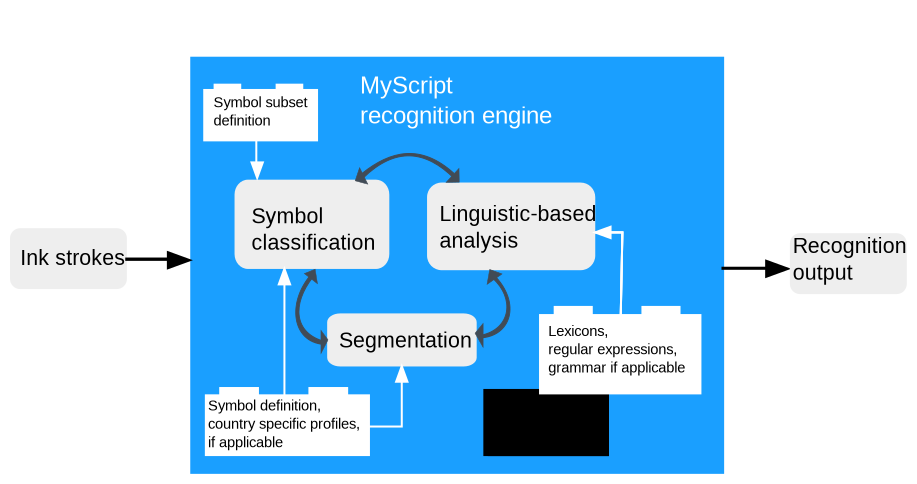
The segmentation tries to cut or group strokes together. Each group hypothesis attempts to match as close as possible an existing symbol. For instance, it can group strokes to form a character, or a shape and so on.
Those nested processes exchange information in a smooth way to find the most probable recognition result. Context and existing results allow to refine the recognition too.
Recognition resources
The MyScript technologies need more than digital ink input to recognize handwriting. The linguistic-based analysis relies on a set of rules that define the way the existing symbols of an input can be combined to make up a meaningful content.
We have conceived the concept of “resources” to specify those rules. MyScript resources come as .res files. They are binary assets containing the decisive data to perform a meaningful interpretation of digital ink.
So, when you plan to perform recognition with MyScript iink SDK, it is vital to choose the resources properly. This choice highly impacts on the efficiency and the accuracy of the recognition.
According to a type of content, you select the semantic rules applied to interpret the input: For text content, the language choice picks the alphabet and grammar. In the same way, for math content, you can choose symbols and grammar.
MyScript iink SDK comes with default resources that you might customize according to your needs.
Recognition output
Ink preparation and interpretation carry out the recognition. In the example below, the aim is to recognize that the word (in case of text) “hello” is written.
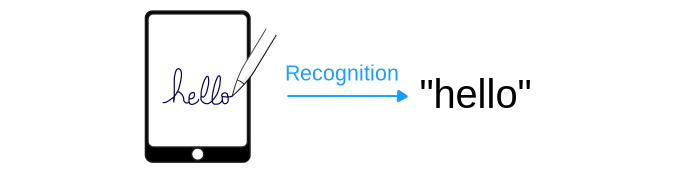
The output of the recognition process is available in the form of a tree.
The tree structure and content depend on the type of recognition that you are running: text, maths, diagram. In any case, it contains symbol(s) or group(s) of symbols that may match the input ink. For words, the output contains several possible matches. We refer to them as candidates.
The output tree also includes spatial information such as bounding boxes.