Storage
This page explains how iink SDK lets you organize the data it works on, store content and load it again later.
Structure of the model
MyScript iink SDK stores content using the following structures:
Parts host the data iink SDK works on. As a result, it is required to use them even if you do not intend to persist data on the disk as part of your application workflow.
Working with packages
MyScript iink SDK uses the file system to limit the amount of RAM that is required at a given point in time, as well as to store temporary files. It also provides serialization/deserialization methods to let application save/load MyScript data, either for persistence needs or to exchange it between users.
Temporary folder
Even if you do not intend to explicitly save any content, MyScript iink SDK requires a read/write access to at least one folder on the file system: the temporary folder, where it will output the intermediate files it is working on.
By default, iink SDK uses the folder where the package file is located. It may however be relevant (and even mandatory on certain platforms) to choose
another folder. This can be achieved by setting the value of content-package.temp-folder in the configuration of the engine.
Creating and loading packages
Both methods take as their first parameter the name of the file corresponding to the package on the file system.
Saving packages
The following diagram explains how iink SDK manages the memory, as well as the role of the different save operations:
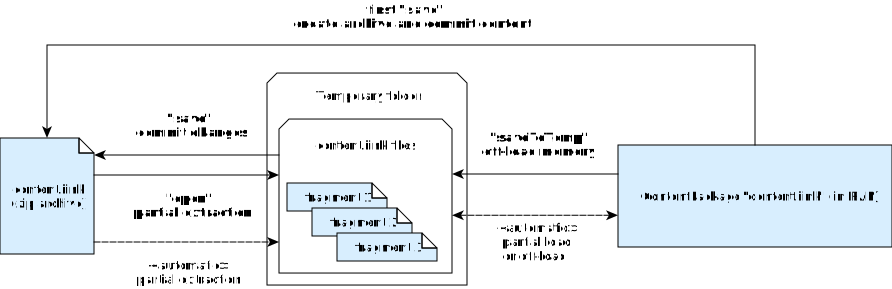
-files suffix and
located in the same folder.Deleting packages
Working with parts
Parts are created and manipulated from their parent package.
Creating parts
To "move" a part from a package to another, first clone it into the new package and then delete the part from the original package.
Opening parts
Deleting parts
Metadata
The structure representing metadata is a ParameterSet and is manipulated the exact same way as engine configuration parameters.
Let's now see how iink SDK can render some content.