OffscreenEditor
This page explains how you can use interactivity without using iink SDK rendering.
Offscreen Interactivity use case
Up to iink SDK 2.0, it was necessary to use the iink SDK rendering in order to benefit from iink SDK interactive features. In 2.1, while keeping our classical Editor and its related objects and interfaces, we introduced the Offscreen Interactivity feature based on an OffscreenEditor.
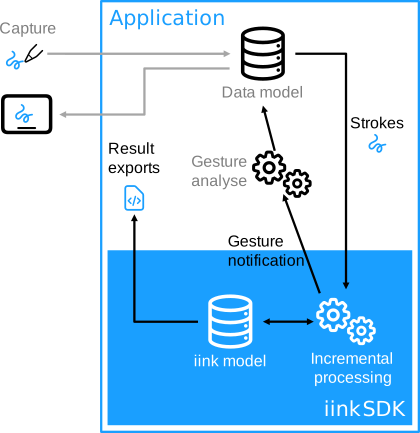
This new feature lets the integrator programmatically drive the content model update by keeping the incremental recognition principle and using gesture notifications. The application can rely on its own rendering to manage the captured strokes and display its model. Recognition results are available on demand with dedicated APIs.
Offscreen Interactivity main objects
For the moment, this feature is only available for “Raw Content” parts. It relies on these new objects and interfaces:
- OffscreenEditor is a service allowing offscreen interactivity. It is the entry point to edit an associated part and receive change notifications.
- ItemIdHelper allows working with item IDs (i.e. strokes). It is associated with an OffscreenEditor.
- IOffscreenEditorListener the listener interface for receiving OffscreenEditor events.
- IOffscreenGestureHandler The listener interface for handling gesture events.
Offscreen Interactivity undo/redo
- HistoryManager gives you access to undo/redo stack manipulation, just like the legacy
Editorand content of changesets. The goal of theHistoryManageris to allow you to use undo/redo to preserve text recognition, rather than redoing strokes, which can change stroke order and recognition output. - To help you synchronize your undo stack with ours, we also give you access to changesets, so you can know what our next undo/redo will do. A changeset contains N ChangesetOperation which each corresponds to an operation (ADD, ERASE or TRANSFORM) on a list of item IDs.
- For performance reasons, a
HistoryManageris associated with anOffscreenEditoron creation, only ifoffscreen-editor.history-manager.enableis set totrue(by default this parameter isfalse). It can then be accessed withOffscreenEditorgetHistoryManager()method.
Improve user experience
Sometimes, the block extraction or ink classification does not give the expected result, leading to a degraded user experience with some ink recognized as text instead of shape, or shape as drawing, etc.
In order to cope with such a situation, you can force a set of items to be classified as a specific type and/or grouped them with the OffscreenEditor setItemsType().
The getAvailableItemsTypes() returns the list of possible types for a set of item ids.
The setItemsType() can also be used to perform math recognition on a selection of items. In this case, make sure to activate the math recognition by adding the math in the raw-content.recognition.types and deploy the math resources in your application.
Offscreen Interactivity API and samples
The offscreen-interactivity sample is an Android sample which shows how to integrate MyScript iink SDK interactivity with your own rendering. It drives the content model by sending the captured strokes to iink SDK and keeps the incremental recognition principle and gesture notifications. This sample uses a third-party rendering library to manage the captured strokes and display its model, and get real-time recognition results and gesture notifications.
➤ For more details, refer to the API documentation and/or contact our support team.