Being production ready
Here are some best practices before launching your application in production.
Subscribing
When registering as a MyScript developer, you get a 2,000 request free quota to develop and test your application.
There are no key figures for user usage as it varies too much from an application to another. We recommend you to use the Cloud console while doing a user test to grab the figures on your application's Cloud usage.
You will need to sign a contract before you can go live, so you will need to contact our Sales Team. For more details, see the Pricing section.
Securing your application
Filters are powerful features accessible from your Cloud dashboard. In the Applications list, open the one that your application is currently configured with. Filter configuration is accessible by clicking on Filters tab.
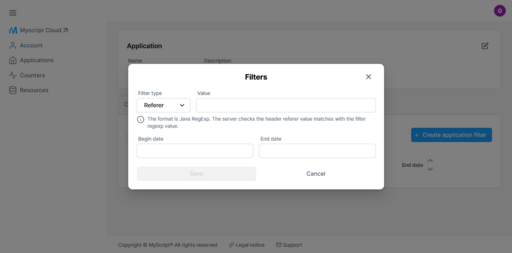
Before deploying into production you have to create an application filter on IP address or Referer. Both accept valid JAVA regexp as input. After setting up a filter, all requests that do no match the filter will be rejected and will not be charged.
Installing MyScript Server on your premises
If you want to host MyScript Cloud API on your premises, MyScript Server is what you need. Please contact our commercial team for more information. Tell us more about your use case and your constraints and we will be glad to help!
Asking for MyScript support
Please contact us to get assistance from our consultants to build and deploy your application embedding MyScript technology.