MyScript iink SDK Web REST Overview
Overview
Call to the REST API of the iink SDK allows you to easily recognize digital content from your already collected strokes. The REST iink recognition APIs consist of two endpoints which take charge of several types of recognition:
<host_of_rest_endpoint>/api/v4.0/iink/batch/allows you to use our legacy recognitions engines.<host_of_rest_endpoint>/api/v4.0/iink/recognize/allows you to use our latest recognitions engines.
Each call to the API allows you to perform iink recognition and output in the requested format.
Swagger API specifications
The swagger API specification of the iink SDK REST recognition is embedded in the REST endpoint.
You can reach it getting <host_of_rest_endpoint>/rest_endpoint/api-docs.
It can be useful to use a client UI in order to get the API in a human-readable form. For example, Swagger UI
For example, the Swagger specifications of MyScript's cloud production environment can be reached here in a raw format and here using SwaggerUI.
Output formats
The setting of the output format is compliant with HTTP standards. The required mime type of the recognition result must be set in the Accept HTTP header . Available mime types depend on the recognition type and endpoint. The recognition service will choose the first available mime type of the list as the output mime type and set accordingly the Content-Type HTTP header of the response.
Jiix is a common JSON format introduced by MyScript that can be used as an output for most type of recognition. Its content can be parametrized in the [configuration]confJiix.
Its mime type is application/vnd.myscript.jiix.
application.json MUST appear in the list of mime type in the Accept HTTP header.The recognition service does not recognize the following features of the Accept HTTP header and will send an error if found:
- Range type or subtype (
*/*,application/*) - Factor weighing (
;q=0.5)
Example of valid Accept HTTP header for text recognition : "application/vnd.myscript.jiix,application/json".
Credentials
The application key has to be set as-is in every call to the API in the applicationKey header of the HTTP request.
The HMAC authentication code is computed using:
- The SHA-512 algorithm
- The whole body of the HTTP Request as the message to be hashed
- The concatenation of the
application keyand thehmac keyas the user key.
The resulting code has to be set in the hmac header of the HTTP request.
Please find here a javascript example of computing the HMAC code.
Body of the request
The body of the request contains several parts to adjust the recognition, that depend on the recognition engines. All requests include the strokes coordinates of the ink to recognize.
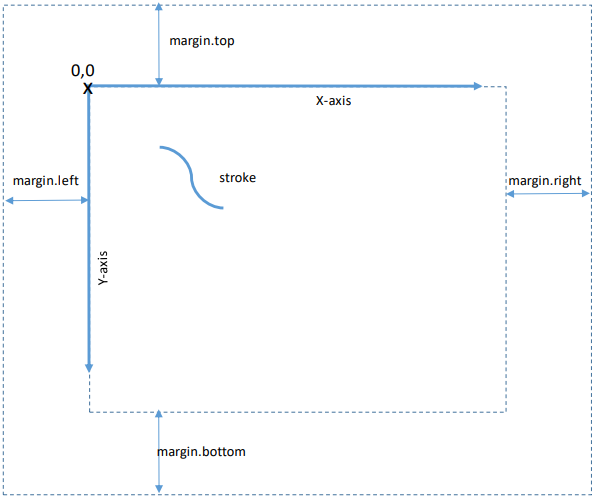
Any x and y coordinate has to be calculated from the starting point as described below.
Response
Response structure
Any call to the iink REST SDK returns the 200 HTTP code if everything goes smoothly with the output result in the body of the response.
The Content-Type HTTP header is set accordingly to the output format.
Should any problem occur during the recognition process, the HTTP return code is set to a different value and the response contains a JSON object which structure is:
| attribute | Definition |
|---|---|
| code | The code of the error |
| message | A message that gives more information about the error |
Errors
When it is relevant, a location of the error is provided in the message. In that location information, the first index of arrays is 0.
| Http code | Error code | Explanation |
|---|---|---|
| 400 | recognition.invalid.stroke | There is a problem with the structure and/or the values in the definition of a stroke. That can be arrays not having same sizes or empty stroke or coordinates outside the writing area (too big or negative). |
| 400 | recognition.stroke.empty | A stroke is empty. |
| 400 | recognition.stroke.missing.array | A mandatory array is missing in a stroke. |
| 400 | recognition.stroke.wrong.array.size | An array has a wrong size. In a stroke, X, Y, P and T arrays must have the same size if they are provided. The reference for the excepted size is the X array. |
| 400 | recognition.stroke.null.value | There is a null value in an array of a stroke. |
| 400 | recognition.stroke.negative.value | There is a negative value in P or T array in a stroke. |
| 400 | recognition.stroke.timestamp.too.big | A time value in a T array of a stroke is beyond the maximum timestamp. |
| 400 | recognition.stroke.chronological.error | Two sequential time values in a T array do not respect chronological order. |
| 400 | recognition.no.strokegroup.found | There is no strokeGroup in the payload. |
| 400 | recognition.strokegroup.empty | There is no stroke information in a strokeGroup. |
| 400 | recognition.invalid.pointer.type | The pointer type was not set with an authorized value. |
| 400 | recognition.limit.exceeded | The ink that was sent exceeds the capacity of the recognition engine. It is likely that the ink contains too many strokes that cannot result in a structured document. |
| 400 | configuration.resource.not.found | The [resource]textCustom you used for the recognition was not found. It has to be [built]textCustomBuild before recognition. |
| 400 | configuration.resource.duplicate.math.grammar | Two math grammars were provided, one by id and one by content. There can be only one math grammar provided for a math recognition. |
| 400 | configuration.resource.bad.grammar | There are compilation errors in the provided math grammar. |
| 400 | configuration.invalid.theme | The provided theme is not valid CSS. |
| 400 | configuration.invalid.pen.style | The provided penStyle is not valid CSS. |
| 400 | configuration.invalid.pen.style.classes | One of the provided penStyleClasses does not refer to a class from the theme. |
| 400 | configuration.invalid.conversion.state | The conversionState is invalid. |
| 400 | recognition.conversion.state.not.supported | The conversionState is not valid for this type of recognition. |
| 400 | api.json.error | The body of the request is not valid JSON. |
| 400 | api.missing.invalid.parameter | A mandatory parameter is missing. |
| 400 | api.unrecognized.property | An unrecognized parameter has been found. |
| 400 | api.invalid.format | A property doesn't have the required format (for example int instead of string). |
| 400 | api.mapping.error | General JSON mapping error. |
| 400 | incorrect.ink.error | The ink is incorrect (for example when a stroke has too many points). |
| 401 | access.not.granted | The application key does not exist or the HMAC signature is invalid. Please refer to documentation of credentials. |
| 403 | access.account.counter.threshold.reached | A counter of your application has reached aconfigured threshold. Please refer to the pricing page. |
| 403 | access.account.disabled | The account that owns the application key is disabled. Please contact support or use another application key. |
| 403 | access.account.expired | The account that owns the application key has expired. Please consider registering another account or using another application key. |
| 403 | access.account.not.activated | The account that owns the application key is not activated. Please contact support or use another application key. |
| 403 | access.application.deleted | The account that owns the application key has been deleted. Please consider registering another account or using another application key. |
| 403 | access.application.disabled | The application relative to the application key is disabled. Please contact support or use another application key. |
| 403 | access.invalid.application.key | The application key has been revoked. Please consider registering another account or using another application key. |
| 403 | access.bad.ip.address | The call to the API is not granted from this IP address. Please contact support. |
| 403 | access.bad.referer | The call to the API is not granted for this HTTP referer. Please contact support. |
| 403 | access.empty.cartridge | Your cartridge is empty. Please refer to the pricing page. |
| 403 | access.empty.global.cartridge | The global cartridge of your site is empty. Please refer to the pricing page. |
| 403 | access.invalid.language | The asked language is not authorized for your application. Please control that the language code you provided exists or refer to the pricing page or contact support. |
| 403 | access.ip.filter.rejected | The IP address of the caller does not match the set IP filter. Please contact support. |
| 403 | access.mandatory.parameter | The application relative to the application key is configured to need a mandatory parameter. Please contact support. |
| 403 | access.quota.exceeded | A qouta has been exceeded for the applicationrelative to the application key. Please contact support. |
| 403 | access.recognition.type | The application relative to the application key does not have access to the asked recognition type. Please contact support. |
| 403 | access.revoked | The application relative to the application key has been revoked. Please consider registering another account or using another application key. |
| 403 | access.userid.missing | The application relative to the application key requires an userID. Please contact support. |
| 413 | access.payload.too.big | The payload size exceeds the server limits. |
| 416 | recognition.no.suitable.mime.type | No mime type acceptable for the type of recognition was found in the Accept HTTP header. Please refer to the docupentation to find out what mime type you can use. |
| 500 | internal.error | Internal error. Please contact support and provide the corresponding message. |