MyScript iink SDK Web REST Architecture
Overview
Call to the REST API of the iink SDK allows you to easily recognize digital content from your already collected strokes. The REST iink recognition API consists of one REST endpoint which takes charge of all types of recognition. Each call to the API allows you to perform iink recognition and output in the requested format.
In version 3.1 iink REST API performs the following types of recognition:
- Text
- Math
- Diagram
- Raw Content
Swagger API specifications
The swagger API specification of the iink SDK REST recognition is embedded in the REST endpoint.
You can reach it getting <host_of_rest_endpoint>/api/v4.0/iink/batch/api-docs.
It can be useful to use a client UI in order to get the API in a human-readable form. For example, Swagger UI
For example, the Swagger specifications of MyScript's cloud production environment can be reached here in a raw format and here using SwaggerUI.
Output formats
The setting of the output format is compliant with HTTP standards. The required mime type of the recognition result must be set in the Accept HTTP header . Available mime types depend on the recognition type. The recognition service will choose the first available mime type of the list as the output mime type and set accordingly the Content-Type HTTP header of the response.
application.json MUST appear in the list of mime type in the Accept HTTP header.The recognition service does not recognize the following features of the Accept HTTP header and will send an error if found:
- Range type or subtype (
*/*,application/*) - Factor weighing (
;q=0.5)
Example of valid Accept HTTP header for text recognition : "application/vnd.myscript.jiix,application/json".
Please find a list of available output formats there.
Credentials
The application key has to be set as-is in every call to the API in the applicationKey header of the HTTP request.
The HMAC authentication code is computed using:
- The SHA-512 algorithm
- The whole body of the HTTP Request as the message to be hashed
- The concatenation of the
application keyand thehmac keyas the user key.
The resulting code has to be set in the hmac header of the HTTP request.
Please find here a javascript example of computing the HMAC code.
Jiix format
Jiix is a common JSON format introduced by MyScript that can be used as an output for every type of recognition. Its content can be parametrized in the configuration.
The mime type of Jiix is application/vnd.myscript.jiix.
Overview of the request
The body of the request contains several parts to adjust the recognition (in bold are the mandatory parts):
- Size of the writing area
- Configuration (default values will be used if no configuration is provided)
- Recognition type
- Inks
- Styling
- Conversion indication
Overview of the request body:
{
    "xDPI": 90,
    "yDPI": 90,
    "width": 800,
    "height": 1200,
    "contentType": "Text",
    "conversionState":"DIGITAL_EDIT",
    "theme": ".text { font-family: Open Sans; font-size: 10;}",
    "configuration": { },
    "strokeGroups": [ {
        "penStyle":"color: #00FF00;",
        "strokes": []
        }
    ]
}
You will find complete request bodies in the Swagger-ui or in the examples listed below.
Recognition type
The recognition type is configured using the contentType attribute. It can have the value:
TextDiagramMathRaw Content
Ink sending
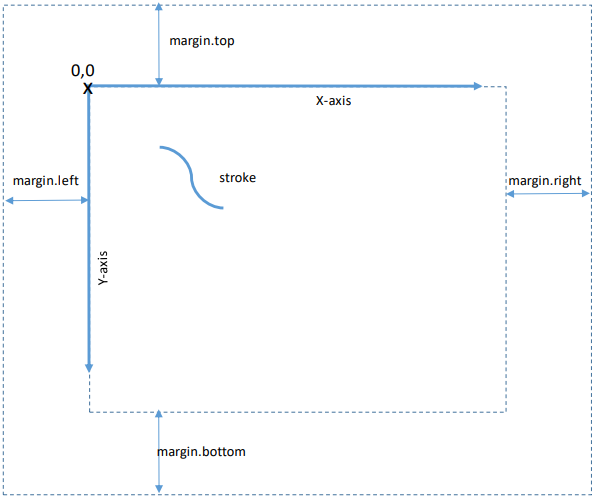
Setting the size of the writing area
The size of the writing area is configured using the non mandatory attributes:
widthheight
width and height if omitted will be automatically calculated using the strokes and the potential margin configuration.
Any x and y coordinate has to be calculated from the starting point as described below.
Setting the resolution of the input surface
Although you might not display the strokes, you need to provide proper dpi values. These correspond to the “resolution” of your input surface, be it a digital screen or a sheet of paper. They will provide the recognizer with a sense of “writing scale” and help it favor the right hypotheses.
xDPIthe number of pixels per inch of the input surface in the X dimension.yDPIthe number of pixels per inch of the input surface in the Y dimension
xDPI and yDPI have a default value of 96. You might have to tune these values to improve recognition results, particularly if your horizontal and vertical DPI values are different.
Stroke
An input stroke is represented by arrays:
- The
xarray contains the x coordinates of the points of the stroke - The
yarray contains the y coordinates of the points of the stroke - The optional
tarray contains the timestamps in milliseconds of the points of the stroke. There is no need for them to represent the exact epoch time of the point as the recognition engine will treat each of them in comparison with the first one. - The optional
parray describe the normalized pressure for each stroke point. Pressure values must respect0 < value < 1.
You can assign an optional id attribute to the stroke. This feature is for future uses.
You can provide an optional pointerType attribute to the stroke. Allowed values are "PEN", "TOUCH" and "ERASER". The default value is "PEN".
You can provide an optional pointerId attribute. The pointer id identifies the device that was used to write the stroke (the id of the stylus or pencil, the finger that is moving in case of two-finger touch, ...).
Stroke groups
Lists of strokes are grouped in strokeGroups.
A stroke group allows to associate a pen style to a series of strokes. Pen styles can be set in two ways:
- by setting valid CSS in
penStyle - by setting CSS classes in
penStyleClasses. The listed CSS classes have to be defined in the generalthemeattribute.
Styling
Styling enables personalisation of your writings.
A general CSS style for the whole writing area can be set in the theme attribute.
Plus, for each series of strokes you can indicate a different style for the pen by setting in the corresponding strokeGroup:
- direct CSS in the
penStyleattribute - references to CSS classes of the
themein thepenStyleClassesattribute.
More on CSS styling can be found in the Styling reference page.
Example of strokeGroups
Here is an example of the iink input for a series of three strokes, the last one being not of the same color as the two first ones.
"strokeGroups": [
        {
            "strokes": [
                {
                    "x":[167,164,162,160,158,157,156,155,154,153],
                    "y":[124,129,133,137,143,146,149,152,155,159],
                    "t":[0,141,159,175,191,208,225,241,275,308]
                },
                {
                    "x":[212,210,209,208,208,207,204,203,202,201,201,201,201],
                    "y":[123,131,135,139,142,145,150,153,157,160,163,166,169],
                    "t":[1238,1292,1309,1326,1342,1360,1393,1409,1427,1443,1460,1476,1493]
                }
            ]
       },
       {
           "penStyle": "color: #00FF00;",
            "strokes": [
                {
                    "x":[148,151,155,158,163,168,171,176,180,184,187,190],
                    "y":[170,169,168,167,167,167,167,167,168,170,171,174],
                    "t":[4897,5043,5078,5094,5128,5159,5177,5210,5227,5260,5293,5328],
                }
            ]
       }
    ]
Language choice
The language for the text recognition in Text and Diagram is configured in the configuration.lang attribute.
The language code is build that way:
- ISO 639-1 two-letter code of the language.
- The character "_".
- ISO 3166-1 two-letter code of the country.
For example, use en_US for American English.
Supported interactive languages list for iink SDK 4.5 is available here.
In addition to this list, the following non-interactive languages are supported by the REST API:
- Arabic
- Farsi - Iran
- Hebrew - Israel
- Hindi - India
- Thai - Thailand
- Urdu - Pakistan
With these non-interactive languages, you can perform recognition, but conversion is not possible.
Text recognition
The text recognition of the iink SDK enables recognition of multiline cursive text in the selected language.
If you ask for application/vnd.myscript.jiix output, you can have information about how the text was recognized and what were the alternative recognition candidates.
In addition to the application/vnd.myscript.jiix output format, you can also ask for the following output:
| Format | Mime type |
|---|---|
| Raw text | text/plain |
| Microsoft Word (OpenXML) | application/vnd.openxmlformats-officedocument.wordprocessingml.document |
| JPEG image | image/jpeg |
| PNG image | image/png |
| MyScript iink binary file | application/vnd.myscript.iink |
You can customize the text recognition using custom resources that you priorly built. You can also set your own custom lexicon for each call.
Please refer to the configuration guide for an exhaustive list of configuration options for the Text recognition.
Here is an example of Text recognition.
Diagram recognition
The diagram recognition of the iink SDK handles a series of shapes, text and connection features.
You can find more about Diagram structure in the description of the jiix format.
In addition to application/vnd.myscript.jiix output format, you can also ask for the following output:
| Format | Mime type |
|---|---|
| SVG | image/svg+xml |
| GraphML | application/graphml+xml |
| Microsoft Word (OpenXML) | application/vnd.openxmlformats-officedocument.wordprocessingml.document |
| Microsoft Office openXML presentation format | application/vnd.openxmlformats-officedocument.presentationml.presentation |
| Microsoft Office clipboard format | application/vnd.microsoft.art-gvml-clipformat |
| JPEG image | image/jpeg |
| PNG image | image/png |
| MyScript iink binary file | application/vnd.myscript.iink |
Regarding the Microsoft Office clipboard format, saved as a file at a location you define. It is up to you to place it into the clipboard using the Art::GVML ClipFormat key. Note also that Microsoft Office does not support pasting content from the system clipboard on all platforms.
You can customize the text recognition in the Diagram using custom resources that you priorly built. You can also set your own custom lexicon for each call.
Please refer to the configuration guide for an exhaustive list of configuration options for the Diagram recognition.
Here is an example of Diagram recognition.
Math recognition
The math recognition of the iink SDK enables recognition of math equations.
Here is a list of math symbols that can be recognized and rules to combine them.
In addition to application/vnd.myscript.jiix output format, you can also ask for the folling output:
| Format | Mime type |
|---|---|
| Latex | application/x-latex |
| MathML | application/mathml+xml |
| Microsoft Word (OpenXML) | application/vnd.openxmlformats-officedocument.wordprocessingml.document |
| MsOffice Open XML Math format | application/mathofficeXML |
| JPEG image | image/jpeg |
| PNG image | image/png |
| MyScript iink binary file | application/vnd.myscript.iink |
Equations sent to the iink SDK can also be solved. If the solver is enabled, the equation will be solved automatically for the application/vnd.myscript.jiix output (the answer node will be marked as generated) and upon conversion for the other output formats.
You can restrict the number of math symbols that can be recognized using a custom grammar. There is two way to provide a custom grammar:
- You can provide the text of the grammar in the configuration (
configuration.math.customGrammarContent). This gives you the opportunity to construct it dynamically. - You can upload a grammar resource using the admin UI and provide the id in the configuration (
configuration.math.customGrammarId). We incite you to choose this solution if you have a predefined set of grammars.
Please refer to the configuration guide for an exhaustive list of configuration options for Math recognition.
Here are some examples of Math recognition.
Raw Content recognition
The raw content recognition of the iink SDK enables analyzing unstructured inks to separate parts that correspond to structured text and/or shapes from parts that do not.
Those parts can be retrieved in the application/vnd.myscript.jiix.
The raw-content.recognition.types defines the type of recognition that will be performed on this content and the result that will be available in the JIIX export. Possible values are text and shape.
In addition to the application/vnd.myscript.jiix output format, you can also ask for the following output:
| Format | Mime type |
|---|---|
| JPEG image | image/jpeg |
| PNG image | image/png |
| MyScript iink binary file | application/vnd.myscript.iink |
You can customize the text recognition using custom resources that you priorly built. You can also set your own custom lexicon for each call.
Please refer to the configuration guide for an exhaustive list of configuration options for the Raw Content recognition.
Here is an example of Raw Content recognition.
Conversion
Conversion is the act of replacing ink content with a typeset equivalent. It is different from the recognition process it relies on.
You can ask for conversion of the output using the facultative attribute conversionState. In iink 4.5 it can only have the value DIGITAL_EDIT.
The effects of conversion in iink SDK REST recognition are:
- For
Diagramcontent type, texts and shapes are replaced by a typeset equivalent. The recognition server uses the elements of the theme to determine what font to use. You can see an example of the effect of conversion in the Diagram example. - For
Mathcontent type, conversion solves a solvable equation in all output format if the math solver is enabled. You can see an example of the effect of conversion in the Math example. - Conversion removes all the strokes of the jiix output, even if they are asked in the configuration. In that case the
strokeswill be present but the array will be empty.
Raw Content recognition.Response
Response structure
Any call to the iink REST SDK returns the 200 HTTP code if everything goes smoothly with the ouput result in the body of the response. The Content-Type HTTP header is set accordingly to the output format.
Should any problem occur during the recognition process, the HTTP return code is set to a different value and the response contains a JSON object which structure is:
| attribute | Definition |
|---|---|
| code | The code of the error |
| message | A message that gives more information about the error |
Errors
When it is relevant, a location of the error is provided in the message. In that location information, the first index of arrays is 0.
| Http code | Error code | Explanation |
|---|---|---|
| 400 | recognition.invalid.stroke | There is a problem with the structure and/or the values in the definition of a stroke. That can be arrays not having same sizes or empty stroke or coordinates outside the writing area (too big or negative). |
| 400 | recognition.stroke.empty | A stroke is empty. |
| 400 | recognition.stroke.missing.array | A mandatory array is missing in a stroke. |
| 400 | recognition.stroke.wrong.array.size | An array has a wrong size. In a stroke, X, Y, P and T arrays must have the same size if they are provided. The reference for the excepted size is the X array. |
| 400 | recognition.stroke.null.value | There is a null value in an array of a stroke. |
| 400 | recognition.stroke.negative.value | There is a negative value in P or T array in a stroke. |
| 400 | recognition.stroke.timestamp.too.big | A time value in a T array of a stroke is beyond the maximum timestamp. |
| 400 | recognition.stroke.chronological.error | Two sequential time values in a T array do not respect chronological order. |
| 400 | recognition.no.strokegroup.found | There is no strokeGroup in the payload. |
| 400 | recognition.strokegroup.empty | There is no stroke information in a strokeGroup. |
| 400 | recognition.invalid.pointer.type | The pointer type was not set with an authorized value. |
| 400 | recognition.limit.exceeded | The ink that was sent exceeds the capacity of the recognition engine. It is likely that the ink contains too many strokes that cannot result in a structured document. |
| 400 | configuration.resource.not.found | The resource you used for the recognition was not found. It has to be built before recognition. |
| 400 | configuration.resource.duplicate.math.grammar | Two math grammars were provided, one by id and one by content. There can be only one math grammar provided for a math recognition. |
| 400 | configuration.resource.bad.grammar | There are compilation errors in the provided math grammar. |
| 400 | configuration.invalid.theme | The provided theme is not valid CSS. |
| 400 | configuration.invalid.pen.style | The provided penStyle is not valid CSS. |
| 400 | configuration.invalid.pen.style.classes | One of the provided penStyleClasses does not refer to a class from the theme. |
| 400 | configuration.invalid.conversion.state | The conversionState is invalid. |
| 400 | recognition.conversion.state.not.supported | The conversionState is not valid for this type of recognition. |
| 400 | api.json.error | The body of the request is not valid JSON. |
| 400 | api.missing.invalid.parameter | A mandatory parameter is missing. |
| 400 | api.unrecognized.property | An unrecognized parameter has been found. |
| 400 | api.invalid.format | A property doesn't have the required format (for example int instead of string). |
| 400 | api.mapping.error | General JSON mapping error. |
| 400 | incorrect.ink.error | The ink is incorrect (for example when a stroke has too many points). |
| 401 | access.not.granted | The application key does not exist or the HMAC signature is invalid. Please refer to documentation of credentials. |
| 403 | access.account.counter.threshold.reached | A counter of your application has reached aconfigured threshold. Please refer to the pricing page. |
| 403 | access.account.disabled | The account that owns the application key is disabled. Please contact support or use another application key. |
| 403 | access.account.expired | The account that owns the application key has expired. Please consider registering another account or using another application key. |
| 403 | access.account.not.activated | The account that owns the application key is not activated. Please contact support or use another application key. |
| 403 | access.application.deleted | The account that owns the application key has been deleted. Please consider registering another account or using another application key. |
| 403 | access.application.disabled | The application relative to the application key is disabled. Please contact support or use another application key. |
| 403 | access.invalid.application.key | The application key has been revoked. Please consider registering another account or using another application key. |
| 403 | access.bad.ip.address | The call to the API is not granted from this IP address. Please contact support. |
| 403 | access.bad.referer | The call to the API is not granted for this HTTP referer. Please contact support. |
| 403 | access.empty.cartridge | Your cartridge is empty. Please refer to the pricing page. |
| 403 | access.empty.global.cartridge | The global cartridge of your site is empty. Please refer to the pricing page. |
| 403 | access.invalid.language | The asked language is not authorized for your application. Please control that the language code you provided exists or refer to the pricing page or contact support. |
| 403 | access.ip.filter.rejected | The IP address of the caller does not match the set IP filter. Please contact support. |
| 403 | access.mandatory.parameter | The application relative to the application key is configured to need a mandatory parameter. Please contact support. |
| 403 | access.quota.exceeded | A qouta has been exceeded for the applicationrelative to the application key. Please contact support. |
| 403 | access.recognition.type | The application relative to the application key does not have access to the asked recognition type. Please contact support. |
| 403 | access.revoked | The application relative to the application key has been revoked. Please consider registering another account or using another application key. |
| 403 | access.userid.missing | The application relative to the application key requires an userID. Please contact support. |
| 413 | access.payload.too.big | The payload size exceeds the server limits. |
| 416 | recognition.no.suitable.mime.type | No mime type acceptable for the type of recognition was found in the Accept HTTP header. Please refer to the docupentation to find out what mime type you can use. |
| 500 | internal.error | Internal error. Please contact support and provide the corresponding message. |