Build custom resources
This page describes how to build custom recognition resources to fine-tune the recognition.
How to build resources
This is a two-step process: You should first prepare a resource file. This file is a UTF-8-encoded file containing dedicated resources information.
For Text recognition, possible resources are lexicon and subset knowledge. Lexicon files should have a .txt or a .lex extension, whereas subset knowledge files should have a .txt or a .sk one.
For Math recognition with a math bundle, you can set up your math grammar defining the symbols and rules. They shall be saved in a .txt or .def file.
How to compile resources
MyScript Developer Portal comes with an online tool that lets you compile your own resources files to generate the corresponding binary .res file.
Text
Lexicon
The lexicon is a list of words or expressions that is being used by the engine to recognize a specific set of terms. You can create your own lexicon to improve the recognition. It may contain terms that are unlikely to appear in a classical dictionary but that you will be led to write many times (proper nouns like the name of your company or your employees, your password, a hashtag, etc.).
For example, a lexicon can be the following set:
Johnson
Meyer
Lopez
Gibbons
Cooper
Martin
Bailey
If needed, you can also download another Lexicon example.
Zurich
Geneva
Basel
Lausanne
Bern
Winterthur
Lucerne
Lugano
Biel
Thun
Schaffhausen
Fribourg
Vernier
Chur
Uster
Sion
Subset knowledge
The Subset Knowledge resource (or SK) is a white list that works as a filter to constrain the recognition to a specific set of characters. You can create your own SK to improve the recognition and help the engine reduce the "margin of error". The expected set can be limited to digits or to letters in a given alphabet or language.
For example: In a form field where you expect a phone number, constraining the recognition with a SK could avoid the engine to mistake a "0" for a "O" or a "1" for a "l".
See below examples of SK resources:
0123456789
If needed, you can download another SK example.
1234567890!"#$%&'()*+,-_./:;<=>?@[\]^{}~€¢£¥§×µ±÷|•←→↳⇐⇒✓abcdefghijklmnopqrstuvwxyzABCDEFGHIJKLMNOPQRSTUVWXYZ
Math
Grammar resource
The grammar resource indicates the way to parse handwritten mathematical expressions. It specifies:
- a limited set of terminal symbols,
Terminal symbols are the elementary symbols. They are basic symbols such as a, b, c, …, 0, 1, …, +, -, ±, etc. that cannot be broken down into “smaller” recognized units. See below the list of supported symbols. - a limited set of non-terminal symbols,
Non-terminal symbols describe groups of terminal symbols organized according to rules. - a limited set of rules,
Rules describe the way to parse digital ink. For instance, a fraction is a rule that contains a numerator, a fraction bar and a denominator. The recognizer expects to find these three elements to fit the fraction rule. See below the list of supported rules. - a start symbol.
This defines the way your mathematical expression should be read depending on the above elements.
For example, a grammar resource can be:
symbol = 0 1 2 3 4 5 6 7 8 9 + - / ÷ = . , % | ( ) : * x
leftpar = (
rightpar = )
currency_symbol = $ R € ₹ £
character ::= identity(symbol)
            | identity(currency_symbol)
fractionless ::= identity(character)
               | fence (fractionless, leftpar, rightpar)
               | hpair(fractionless, fractionless)
fractionable ::= identity(character)
               | fence (fractionable, leftpar, rightpar)
               | hpair(fractionable, fractionable)
               | fraction(fractionless, fractionless)
expression ::= identity(character)
             | fence (expression, leftpar, rightpar)
             | hpair(expression, expression)
             | fraction(fractionable, fractionable)
start(expression)
If needed, you can download another Grammar example.
// file: math-grm-standard.def
// version: 1.0
//
// Provides a rather open grammar that can be used to recognize math
// expressions.
// _____________________________________________________________________________

/*
quick reminder about the syntax supported by MkMathGrammar

  . comments:
    . whole line comments starting with //, # or " sign (up to end of line)
    . block comments delimited by /* */ (can be nested)
    . inline comments are not supported

  . terminal symbol definitions:
    . terminal_name = terminal_str
      . terminal_name is defined as: [-a-zA-Z_][-a-zA-Z_0-9]*
      . terminal_str is defined as: ( ( !EOL . )+ | EOL space+ )+
        . space is defined as ' ' | '\t'
        . EOL is defined as '\r\n' | '\n' | '\r'
    . terminal_ str is allowed to span multiple lines provided a "continuation
      line" starts with a space, which allows you to pretty format long terminal
      symbol definitions

  . rule definitions:
    . non_terminal_name ::= rule (| rule)?
      . non_terminal_name is defined as: [-a-zA-Z_][-a-zA-Z_0-9]*
      . supported rules are:
        . identity(source)
        . hpair(left, right)
        . fence(source, left, right)
        . fraction(numerator, denominator)
        . sqrt(source)
        . subscript(source, index)
        . superscript(source, exponent)
        . subsuperscript(source, index, exponent)
        . underscript(source, bottom)
        . overscript(source, top)
        . underoverscript(source, bottom, top)
        . presuperscript(source, exponent)
        . vpair(top, bottom)
        . leftfence(source, left)
        . vlist(source)
        . columnaroperation(digit, carry, decimal_separator_flags, cancel_flags, operation_flags)
          . decimal_separator_flags are defined as 'none' | 'dot' | 'comma'
          . cancel_flags are defined as 'none' | 'cancel' | 'bcancel' | 'xcancel'
          . operation_flags are defined as 'addition' | 'subtraction' | 'multiplication' | 'division english' | 'division french' | 'division dutch' | 'division indian' | 'division german'
      . rule continuations allow you to pretty format rule definitions by
        avoiding repeating target non_terminal_name

  . start symbol definition:
    . start(non_terminal_name)

apart from continuation lines, everything is pretty much space insensitive

*/

// terminal symbol definitions
symbol1 = 0 1 2 3 4 5 6 7 8 9
          A B C D E F G H I J K L M N O P Q R S T U V W X Y Z
          a b c d e f g h i j k l m n o p q r s t u v w x y z
          Γ Δ Θ Λ Ξ Π Σ Υ Φ Ω α β γ δ ε η ζ θ ι κ λ ν ξ π ρ σ τ υ φ χ ψ ω ϕ µ Ψ
          ℂ ℕ ℚ ℝ ℤ 𝔻 ℑ ℜ ℓ
          € $ £ ¥ ₩ ¢
          ( ) < > [ ] { } ⟨ ⟩ ⌈ ⌉ ⌊ ⌋ ⟦ ⟧
          ! # % & ? @ / \ | ∥ © ∂ ∅ ∇ ∞ ℏ ‰ ⊥ ∦ ⫻
          □ △
          km hm dam dm cm mm µm
          ha
          hl dal dl cl ml µl
          kg hg dag dg cg mg µg
          ms µs
          GHz MHz kHz Hz
          dx dy dz dt
          sin cos tan sinh cosh tanh arcsin arccos arctan cot coth
          min max arg argmin argmax
          inf sup lim liminf limsup
          ln log
          card Im Re
          µA µC µF µHz µJ µN µPa µS µT µV µW µWb µWh µbar µcd µeV µlm µlx

symbol2 = + - ± × ÷ * ∘ · = ' , . … : ; _ ⋮
          ← ↑ → ↓ ↔ ↕ ↖ ↗ ↘ ↙ ↼ ⇀ ↽ ⇁
          ⇐ ⇑ ⇒ ⇓ ⇔ ⇕ ⇋ ⇌
          ∃ ∄ ∈ ∉ ∋ ∌
          ∩ ∪ ⊂ ⊃ ⊄ ⊅ ⊆ ⊈ ⊇ ⊉
          ∼ ≃ ≠ ≡ ≢ ≒ ≈ ≄ ≅ ≆ ≇ ≈ ≉
          ≤ ≥ ≪ ≫ ≮ ≯ ≰ ≱
          ∀ ∝ ∠ ∧ ∨ ⦞
          ⊕ ⊗ ⊖ ⊙ ⋉ ⋊
          ¬

symbol3 = ∏ ∑ ∫ ∮ ∬ ∭ ∯ ∰ ∐

symbol4 = ∏ ∑ ∫ ∮ ∬ ∭ ∯ ∰ ∐
              min max arg argmin argmax
              inf sup lim liminf limsup

symbol5 = - ∧ ← → ↔

symbol6 = ( [ { | ∥ ⟨ ⌈ ⌊ ⟦
symbol7 = ) ] } | ∥ ⟩ ⌉ ⌋ ⟧
symbol8 = {

// rule definitions

sqrtTerm ::= sqrt(term)

vectorTerm ::= vpair(term, term)
             | vpair(vectorTerm, term)

system ::= leftfence(vectorTerm, symbol8)

exponentiable ::= identity(symbol1)
                | identity(sqrtTerm)
                | presuperscript(sqrtTerm, term)
                | overscript(term, symbol5)
                | fence(term, symbol6, symbol7)
                | fence(vectorTerm, symbol6, symbol7)

term ::= identity(exponentiable)
       | identity(symbol2)
       | identity(symbol3)
       | hpair(term, term)
       | fraction(term, term)
       | subscript(exponentiable, term)
       | superscript(exponentiable, term)
       | subsuperscript(exponentiable, term, term)
       | underscript(symbol4, term)
       | overscript(symbol3, term)
       | underoverscript(symbol3, term, term)

expression ::= identity(term)
             | identity(system)
             | hpair(term, system)

vlist ::= vlist(expression)

// start symbol
start(vlist)
Grammar syntax
You can build your own MyScript-Math-compliant grammar resource. To do so, you must define the grammar in conformity with the syntax set out below and then compile it.
You can add comments in a grammar resource as follows:
// This is the first way to start a whole comment line.
#  This is the second way to start a whole comment line.
"  This is the third way to start a whole comment line.
/* This is a block comment. */
Inline comments are not supported.
Your grammar resource will contain terminal symbol definitions such as the following:
my_terminal_name = 0 1 2 3 4 5 6 7 8 9
- The terminal symbol name is defined as: [-a-zA-Z_][-a-zA-Z_0-9]
It is a character string which starts with a character from [-a-zA-Z_] and whose other characters are any of [-a-zA-Z_0-9]. In the above example, the terminal symbol name ismy_terminal_name. - The list of symbols referred to by the terminal name are defined as: ( ( !EOL . )+ | EOL space+ )+
The definition of the symbols referred to by the terminal name does not start by a EOL (end of line). They can be any existing character separated by a space or EOL and a space. In other words, the definition of the symbols is allowed to span multiple lines, providing that the “continuation line” starts with a space. This means you can format long terminal symbol definitions in a more visually organized (“pretty-formatted”) manner. In the above example, the list of symbols referred to bymy_terminal_nameis0 1 2 3 4 5 6 7 8 9. - Space is defined as ‘ ’ or ‘\t’
- EOL is defined as ‘\r\n’ or ‘\n’ or ‘\r’
You will also need to list non-terminal symbol definitions. Here is an example:
my_non_terminal_name ::= fraction(my_terminal_name,my_terminal_name)
- The non-terminal symbol name is defined as : [-a-zA-Z_][-a-zA-Z_0-9]
It is a character string which starts with a character from [-a-zA-Z_] and whose other characters are any of [-a-zA-Z_0-9]. In the above example, the non-terminal symbol name ismy_non_terminal_name.
The non-terminal symbol is defined as: non_terminal_name ::= rule (| rule)?
In the above example, the rule is fraction. The example specifies that the numerator is a my_terminal_name symbol and that
the denominator is also a my_terminal_name symbol.
Rule continuations allow you to “pretty format” rule definitions by avoiding a repetition of target non-terminal symbol names.
Finally, your grammar must include the start symbol definition:
start(my_non_terminal_name)
Finally, you must define the start symbol.
In the above example, we specify that the general mathematical expression form that will be recognized is my_non_terminal_name.
In other words, we expect the input digital ink to represent a fraction of digits.
Here is an example of a custom grammar:
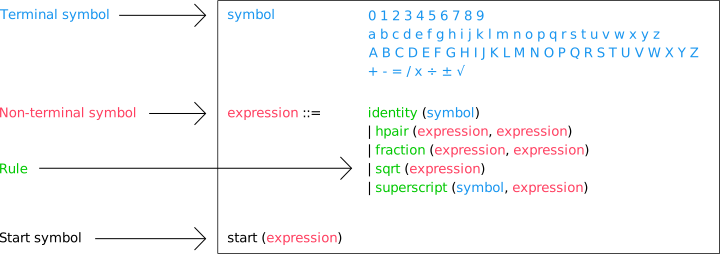
Supported symbols and rules
A non-exhaustive list of supported math symbols and rules can be found here.
It is also possible to create a custom grammar resource, by constraining the recognition for particular use cases (integral calculus, vector calculus, finite element calculus, etc.).
The following table provides for each supported math rule its denomination in the grammar as well as the parameters it supports:
| Rule | Visual structure | Syntax | Explanation |
|---|---|---|---|
| Identity | N/A | identity(source) | Reuse a previously defined symbol in a rule clause |
| Horizontal pair |  | hpair(left, right) | Ordered juxtaposition of the left and right expressions |
| Fence |  | fence(exp, left, right) | exp is placed between the left and right symbols |
| Left fence |  | leftfence(exp, symbol) | symbol is positioned at the left of exp. This allows for instance defining systems |
| Square root |  | sqrt(exp) | exp is placed under the square root |
| Fraction |  | fraction(numerator, denominator) | numerator is divided by denominator |
| Subscript |  | subscript(exp, index) | index is placed as subscript at the right of exp |
| Superscript |  | superscript(exp, exponent) | exponent is placed as superscript at the right of exp |
| Subsuperscript |  | subsuperscript(exp, index, exponent) | index and exponents are respectively placed as subscript and superscript at the right of exp |
| Presuperscript |  | presuperscript(exp, exponent) | exponent is placed as superscript at the left of exp |
| Overscript |  | overscript(exp, top) | top is placed above exp |
| Underscript |  | underscript(exp, bottom) | bottom is placed as subscript at the left of exp |
| Underoverscript |  | underoverscript(exp, bottom, top) | top and bottom are respectively placed as superscript and subscript at the left of exp |
| Vertical pair |  | vpair(top, bottom) | top and bottom are respectively placed one on top of the other |
| Vertical list |  | vlist(exp) | exp represent the expressions that can be placed on several consecutive lines |
| Table |  | table(exp) | exp represent the expressions that can be placed inside the table cell. This allows for instance defining matrices |
| Partial fraction (numerator) |  | partialfractionnumerator(numerator) | Only the numerator of the fraction is defined |
| Partial fraction (denominator) |  | partialfractiondenominator(denominator) | Only the denominator of the fraction is defined |
| Slanted fraction |  | slantedfraction(numerator, denominator) | numerator is divided by denominator |