MyScript Server Migration Guide
The following instruction will let you migrate your MyScript Server installation to MyScript Server 4.5.x-iink.
New prerequisites
Prerequired software checks and upgrades
Ensure that your Linux Debian and Java JRE are up-todate according to the pre-requesites, and if it is not the case, upgrade them.
MyScript Server License file
MyScript Server iink (Interactive Ink SDK) needs a specific license file which must be copied in /var/lib/myscript-iink-server/licenseKey path.
iink recognition resources
From the extracted delivery archive (see prerequisites), copy recursively ./iink-resources/* into /var/lib/myscript-iink-server/resources/
This directory should have 2 sub-directories: conf and resources.
Fonts
Erase the /var/lib/myscript-iink-server/fonts/ content.
Then, from the extracted delivery archive (see prerequisites), copy recursively ./fonts/* into /var/lib/myscript-iink-server/fonts/
The directory must contains a map.json file.
Each font family subdirectory must contain a METADATA.pb file.
Avoid removing a font family. If you want to remove a font, you have to unreference it in the fonts/map.json file
MongoDB schema update
If you upgrade from a MyScript iink Server 2.1 or older, on startup, MyScript iink Server 4.5 will modify the MongoDB schema for the new counters. As a result, older versions of Myscript iink Server will no longer be compatible with MongoDB and will fail on startup. If multiple instances of Myscript iink Server are running with load balancing, it is necessary to upgrade all of them to version 4.5 at the same time.
If you need to rollback from 4.5 to the MyScript iink Server version 2.1 or older, you must first clean up the Mongo database using these Mongo commands:
use myscript-server
db.accountCounter.deleteMany({language: {$ne:null}})
db.accountCounter.deleteMany({quotaType: {$ne:null}})
db.accountCounter.deleteMany({endpoint: {$ne:null}})
db.applicationCounter.deleteMany({language: {$ne:null}})
db.applicationCounter.deleteMany({quotaType: {$ne:null}})
db.applicationCounter.deleteMany({endpoint: {$ne:null}})
Deployment
Uninstall previous packages
With dpkg, uninstall myscript-iink-server and myscript-admin-server packages.
Install new packages
- deb packages are in the .zip archive.
- Install iink backend
iink-server/delivery/myscript-iink-server_<VERSION>_amd64.deb - Install admin backend and ui
admin-server/delivery/myscript-admin-server_<VERSION>_amd64.deb
- Install iink backend
- Configuration files can be tuned:
- /etc/myscript-admin-server/backend.properties
- /etc/myscript-iink-server/backend.properties
- Services are launched with systemd. Systemd services are:
- myscript-iink-server
- myscript-admin-server
- You can control services and check logs with
systemctlandjournalctl- check their status with
systemctl status <MYSCRIPT_SERVICE_NAME> - restart with
systemctl restart <MYSCRIPT_SERVICE_NAME> - check logs with
journalctl -u <MYSCRIPT_SERVICE_NAME>
- check their status with
If you have changed a configuration file, you need to restart the service.
MongoDB
MyScript Server 4.5.x-iink supports MongoDB 5.0, 6.0, 7.0 or 8.0 (recommended). The migration of a replica set can be done without service interruption, on condition that it is performed once MyScript Server 4.5.x-iink is deployed.
For migration instructions, please refer to MongoDB migration guides
Adapt the reverse proxy
We recommend that you read production-installation.
Depending on the version from which you migrate, the main change might be the merge of Admin-ui component with the admin-backend that now serves both Admin API and static content.
Your reverse proxy should behave like the below.
| Path | Redirect To | Default value |
|---|---|---|
/api/v4.0/iink/* | iink Backend | http://iinkhost:8897/api/v4.0/iink/* |
/* | Admin Backend | http://localhost:8895/* |
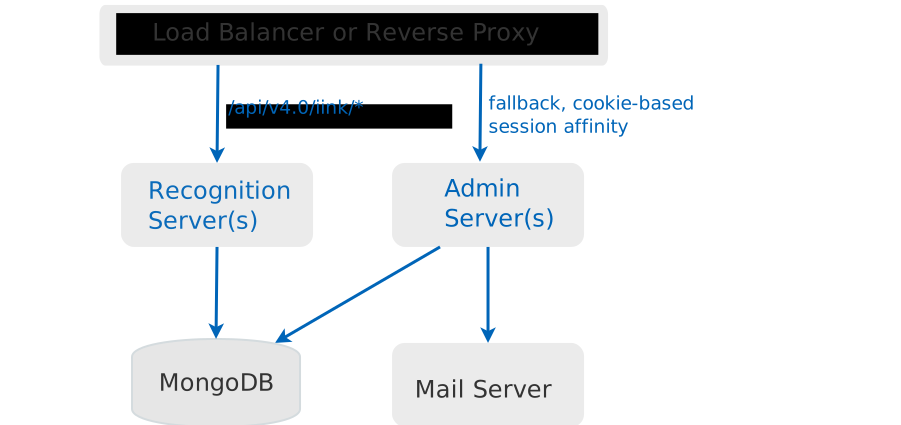
An example of reverseproxy with nginx that is used for the monoserver installation is provided in the reverseproxy directory of the .zip delivery.